FurtherAI Available in Microsoft Marketplace
Introducing Connectors



Endorsement Processing Automation: How AI Agents Handle Location Additions, Broker of Record Changes, and Additional Insureds (2026)

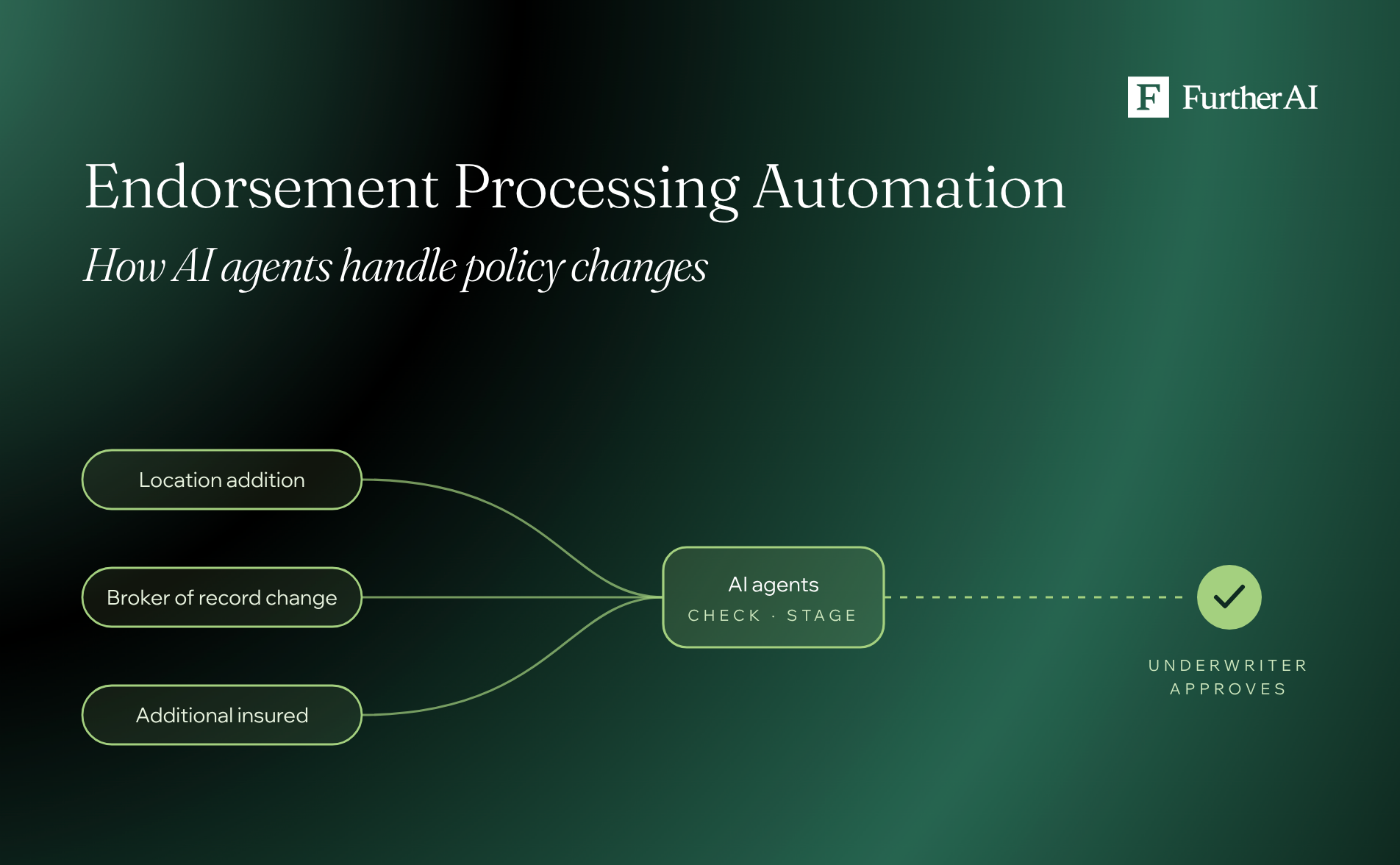
Endorsement processing automation uses AI agents to take a mid-term policy change request from any channel, match it to the live policy, collect only the missing documents, check the change against your servicing rules, and stage it in the policy administration system (PAS) for an underwriter to approve. This guide covers three common commercial requests: location additions, broker of record (BOR) changes, and additional insured requests. Each follows a predictable pattern, which is exactly why agents can run most of the work while a person keeps the final call.
This guide walks through how insurance endorsement processing automation software handles each of the three, with a worked example that ends in underwriter approval. It also covers how agentic tools compare with manual and rules-based approaches, and what a brokerage, carrier, or managing general agent (MGA) should ask before buying an AI policy servicing tool.
Key takeaways
- Endorsements are a document-matching job. Every request asks whether the evidence matches the policy on file and your servicing rules. Agents answer that faster because they read and cite every source.
- Most of the delay sits in the hand-offs. Chasing documents, re-keying data from emails and PDFs, and checking rules by hand are where requests stall.
- Location additions need the most data. A new location needs construction, occupancy, protection, and exposure (COPE) details, values, and a referral-rule check. Agents chase the statement of values (SOV) and fill gaps before the underwriter sees the file.
- BOR changes and additional insureds are mostly verification. The agent confirms who signed, whether the new agency is appointed, and what the contract actually requires, then flags anything that doesn't line up, such as a missing umbrella.
- Processing and checking are different jobs. Processing makes the change; checking confirms the endorsements on a policy match a contract, binder, or prior policy. Most teams need both.
- Keep a human on approval. The best setups stage every change in the PAS and wait for an underwriter's sign-off. Twenty-nine U.S. jurisdictions have now adopted the NAIC's AI model bulletin, which expects documented oversight of AI systems, including vendor tools.
- Judge tools on write-back and audit trail. A tool that answers a broker's email but can't post the change to your system of record leaves the last, slowest step with your team.
What is endorsement processing automation?
An endorsement is a written change to a policy after it's issued, such as adding a location, naming an additional insured, or changing the broker. Endorsement processing is everything between the request and the issued change: reading the request, finding the policy, chasing documents, checking rules, rating, entering the change in the PAS, and sending updated documents such as the certificate of insurance (COI).
Endorsement processing automation hands those steps to AI agents and keeps the decision with your team. Older automation could fill a form once a person had done the reading. AI agents do the reading: they understand a broker's voicemail, compare a lease clause to the policy schedule, and spot that an SOV row contradicts what the broker said on the phone. For the underlying vocabulary, see our plain-English guide to commercial insurance.
Endorsement processing is different from endorsement checking. Checking compares the endorsements already on a policy against a requirement, such as a contract, a binder, or the prior policy. Our guides to AI policy checking software and broker compliance review software cover that work. On the checking side, an insurer using FurtherAI for policy checks and comparisons ran policy checks 20x faster and comparisons 30x faster than manual review. Processing, the subject of this guide, is the work of making the change.
Why endorsement processing is slow and error prone
Most commercial insurance teams handle an endorsement through the same manual path:
- A broker calls or emails with a change.
- Someone finds the policy and works out what's being asked.
- Someone emails back for missing documents, often more than once.
- Data from emails, PDFs, and spreadsheets is typed into the PAS.
- An underwriter reviews the change against guidelines and authority.
- The endorsement is issued and the certificate is updated.
Each hand-off adds delay and a chance for error. The inputs are messy (unstructured emails, scanned letters, and spreadsheets in every format), and many PAS platforms have limited APIs, so throughput ends up capped by headcount.
The cost of that work has gone the wrong way. McKinsey found in July 2026 that insurers' operating expenses as a share of revenue have risen 60% in North America since 2005, even as earlier technology lifted labor productivity across claims, servicing, and policy issuance.
The people who traditionally do this work aren't getting more numerous either. The U.S. Bureau of Labor Statistics counts 239,100 insurance claims and policy processing clerks and projects that number to fall 2% by 2035, citing productivity-enhancing technology.
Service quality also decides who keeps the account. In J.D. Power's 2025 U.S. Small Commercial Insurance Study, a good service experience was the most-cited reason customers stay, and only 55% said they "definitely will" renew, down six points in a year. A location addition that sits in a queue for a week is the kind of experience that shows up at renewal.
How AI agents process an endorsement, step by step
At FurtherAI, we split the work between two specialist agents that pass the case between them, part of our multi-agent system. The underwriter stays at the decision point.
- Intake from any channel. The Servicing Agent takes the phone call, email, broker portal request, or ACORD PDF. On calls, it confirms who's calling and that the policy is active before it hangs up.
- Classify and match. It identifies the request type, extracts the broker, policy, and change details, and looks up the live policy. If the policy check fails, it sends the broker a summary instead of opening a case. Certificate requests route to a separate COI Agent.
- Gather only what's missing. The Endorsement Agent picks up the case with its context attached and asks the broker for the specific document it lacks, such as the signed BOR letter or the revised SOV. Nothing else.
- Check every source. It runs the endorsement validation workflow, comparing the request against the policy record, the documents, external data such as a county lookup, and your servicing rules. Each check is cited to its source.
- Stage the change. It assembles the right forms and stages the endorsement in the PAS, with rating inputs ready.
- Underwriter approves. The underwriter reviews a one-screen packet and approves, refers, or holds. In our demos, that's a single tap in Microsoft Teams.
- Issue and update. Once approved, the agent issues the endorsement, updates premium and installments, and triggers the updated COI. Where the PAS has no API, a web agent built on Computer Use 2.0 enters the change through the screen.
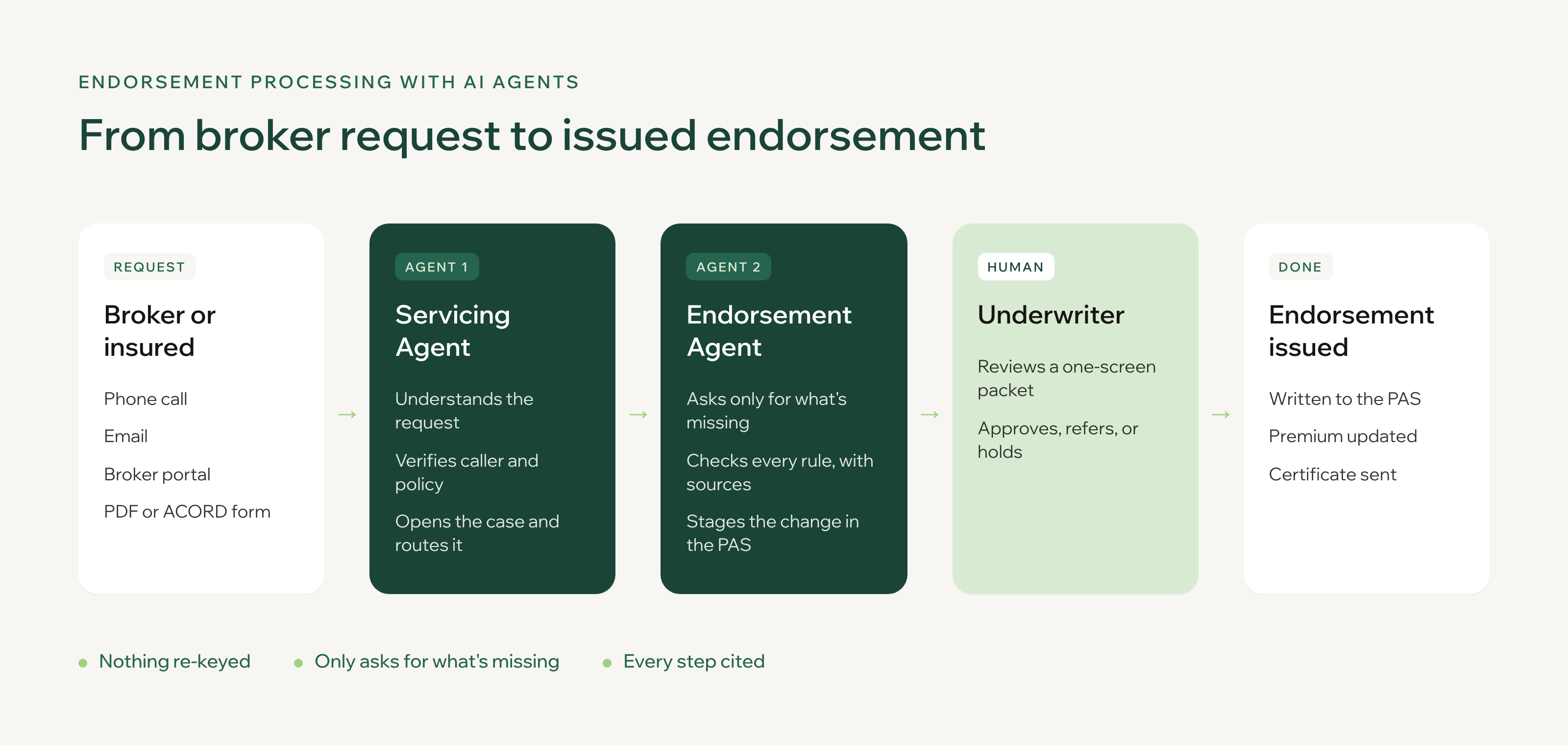
The broker's effort in a typical case is one call and one reply. The underwriter's effort is one decision. Nobody re-keys anything.
Manual, rules-based, generic AI, and agentic: how the approaches compare
Rules-based tools work when every request looks the same, and endorsement requests rarely do. Agentic workflows handle the variation by reading the documents, then hand the decision to a person.
How do I automate location additions to commercial property policies?
To automate location additions, have an AI agent capture the request, collect a revised SOV, extract and validate the new location's COPE data and values, run it against your location rules, and hand the underwriter a recommendation with rating inputs ready. Location additions are the heaviest of the three endorsement types because the agent is effectively underwriting a small piece of new risk.
Here's how it runs in an illustrative case (synthetic data): a broker calls an excess and surplus (E&S) MGA to add a café to a commercial package policy, with a $900,000 building and $150,000 in contents, effective November 1.
- Capture the call. The Servicing Agent records the broker's request word for word, matches the policy, and opens an endorsement case.
- Request the SOV. The Endorsement Agent emails the broker for a revised SOV with the new location, then pauses the case until it arrives. If nothing comes back, it sends a reminder, and the case sits in a waiting-on-broker status that nobody on your team has to chase.
- Read like an underwriter. It reads the revised SOV row by row, fills gaps in construction and sprinkler details, and catches where the SOV contradicts the call, for example a different square footage or occupancy. Underwriters assess property on COPE: construction, occupancy, protection, and exposure, so those fields come first.
- Run location rules. It looks up the county and checks your rules. In the demo, a coastal county or an effective date backdated more than 15 days triggers a referral, and a business that doesn't fit the book gets flagged.
- Recommend. The underwriter gets a clear call (add, refer, hold, or wait), every reason linked to its source, the questions to ask before pricing, and rating inputs ready to price.
Timing matters more than most teams realize. The standard ISO building and personal property form (CP 00 10) can extend coverage to a newly acquired building, if it meets the form’s conditions such as intended use, for up to $250,000 per building, ending 30 days after acquisition or when values are reported. A café worth $900,000 is already past that limit, so a slow endorsement can leave part of the building uninsured. Check your own forms, since manuscript and E&S policies vary.
The SOV step is where most of the time goes, and it's where we have the deepest production record. A top-10 global carrier using FurtherAI for complex SOV intake cut intake to under 10 minutes even for SOVs with 50,000+ locations, with field-level accuracy above 95% at go-live rising to 97% within six months. Before, its team spent one to two minutes per location just validating addresses. For more on SOV extraction, see how we approach SOV processing in submission intake.
How AI agents handle broker of record changes
A broker of record letter tells the insurer that a new broker now manages the insured's coverage. It's usually printed on the insured's letterhead and signed by the company official who oversees insurance, and it often lets the insured change their mind within five to 10 days. BOR changes rarely touch premium, but they touch commissions and relationships, so the evidence has to be clean.
In our illustrative BOR scenario (synthetic data), a new broker asks to take over a freight warehouse operator's commercial general liability policy from the incumbent, effective December 1, 2026. The agents run five steps: intake, documents, signer check, guidelines, and policy update.
The agents show every check with its source, and the underwriter approves before anything changes in the PAS.
How AI agents add additional insureds
Additional insured requests usually arrive because a contract says so: a lease, a vendor agreement, or a construction contract. ISO alone publishes more than 40 additional insured endorsements, from managers or lessors of premises (CG 20 11) to vendors (CG 20 15), so the hard part is matching the contract's wording to the right form and confirming what the policy already includes.
Two illustrative cases (synthetic data) show the range.
A simple add from one call. A broker calls on behalf of a boutique whose landlord has hired a new property manager, and the lease requires that manager to be named. The Servicing Agent takes the call and matches the policy. The Endorsement Agent emails the broker for the landlord's letter, confirms the property manager manages the insured location, checks that only the landlord is currently named and that the caller is broker of record, and prices it at $50 a year, $12 due. The underwriter approves the one-screen packet, and the agent issues the endorsement and sends the updated certificate.
A retailer add that surfaces a gap. A sauce maker needs to add a grocery chain as an additional insured, and the grocer's supplier requirements come attached. The agent checks each requirement against the policy:
The agent adds what the policy can add and flags what it can't. That umbrella gap is the kind of finding that otherwise surfaces after a claim. If your team also verifies endorsements before certificates go out, our guide to broker compliance review software covers that check in depth.
What should our brokerage look for in AI policy servicing tools?
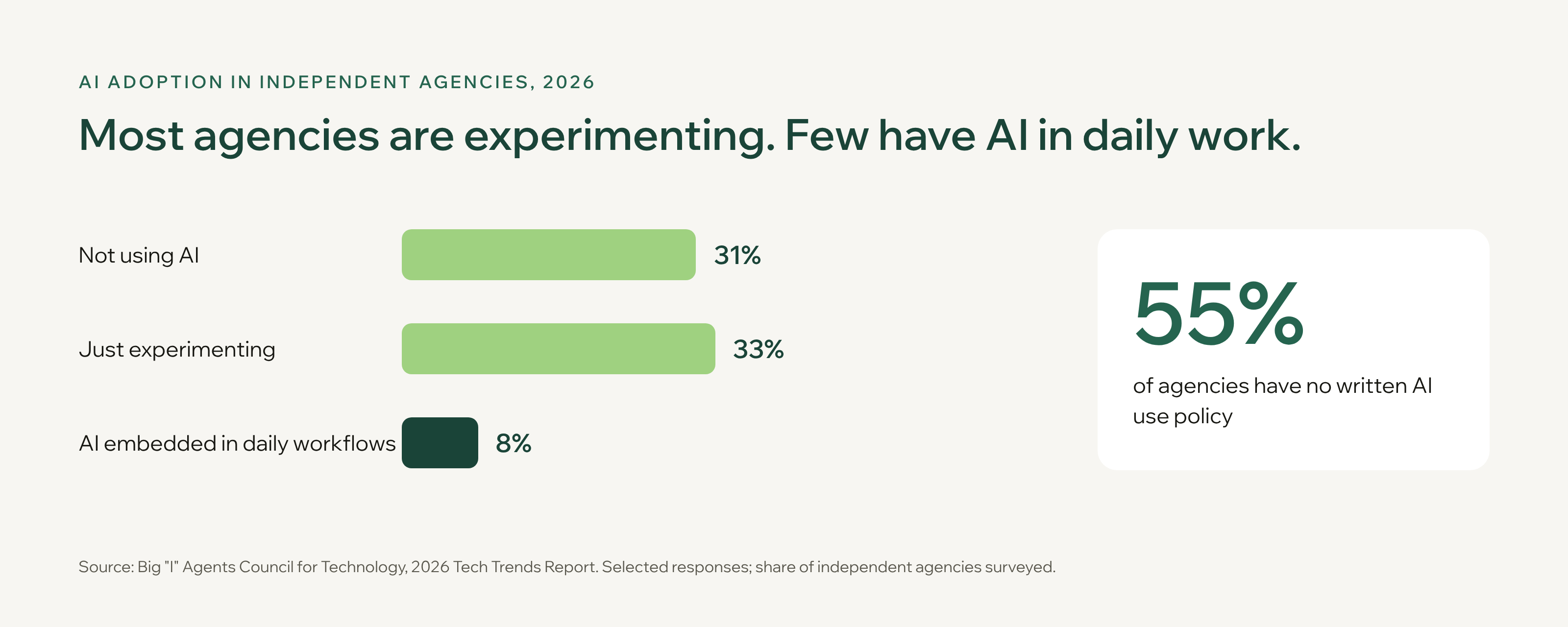
Look for a tool that works in the channels your clients already use, writes the change back to your systems of record, cites every check, keeps a human on approval, and meets carrier-grade security. Brokerages are weighing commercial insurance endorsement review automation software as overall AI adoption climbs, but governance hasn't kept up: the Big "I" 2026 Agency Universe Study found 46% of agencies now use AI, up from 15% in 2024, while the Big "I" 2026 Tech Trends Report found only 8% have AI embedded in daily workflows and 55% have no written AI use policy.
Use these nine criteria to separate servicing tools that finish work from ones that only answer questions.
- Phone, not only email. 86% of agencies in the Agency Universe Study prefer servicing customers by phone. A tool that only reads inboxes won’t see requests that arrive by phone. Ask whether it can answer calls live and capture the request accurately.
- Write-back to your PAS, plus email and document integration. Ask which fields it writes, through what (API, connector, or screen-level automation), and what happens when a source is missing. It should also read requests where they arrive, such as Microsoft Outlook and SharePoint, so nobody forwards emails into a separate tool. Our guide to AI workspaces for policy administration lists five write-back tests to run in a pilot.
- Minimal broker chasing. The agent should request only the missing document and wait, not send a generic checklist.
- Citations on every check. Each conclusion should link to the page, row, or rule it came from, so a reviewer can accept it in seconds. We explain why in our piece on citations in AI.
- Configurable servicing rules. Your referral triggers, authority limits, and appointment lists should drive the checks, not a vendor's defaults.
- Human approval before anything posts. The NAIC's model bulletin on insurers' use of AI has been adopted in 29 jurisdictions as of November 3, 2026, and NAIC guidance sets expectations for governance, documentation, testing, and third-party oversight. Your carriers will expect the same of tools that touch their policies. See our guide to AI governance for insurance teams, and look for agents that loop in the right person at the right step.
- A complete audit trail. Every step should be logged and reportable: what the agent read, what it checked, what it changed, and who approved it. You'll need that record for E&O questions and carrier audits.
- Security you can show a carrier. Data privacy and compliance risk is agents' top AI concern (24%) in the Tech Trends Report. Ask for SOC 2 Type II, encryption at rest and in transit, data isolation such as a single-tenant architecture, and a contractual commitment that your data won't train the vendor's models. FurtherAI’s security overview covers its SOC 2 Type II audit, encryption, and contractual no-training commitment.
- Room to expand. Start with one workflow, such as endorsements, and check you can add certificates of insurance, renewals, and claims on the same platform without a new integration project.
Start with the work you already know is manual. Leavitt Group, one of the largest independent insurance brokerages, began with account manager workflows such as proposal building, policy checking, and document comparison. Describing a loss run a producer had spent hours on with general AI tools, Chief Project Officer Laurie Flanagan said: “When they ran the same file through FurtherAI, it produced exactly what they needed in minutes.” Servicing requests are a natural next step once those foundations are in place, and the steps below show how to start.
How to get started with endorsement processing automation
- Pick one endorsement type. Start with the one you process most, usually location additions or additional insureds.
- Write down your rules. Capture the checks your team applies today, including referral triggers such as coastal counties, backdated effective dates, and authority limits.
- Connect email and your PAS. FurtherAI connects through Connectors, Outlook and SharePoint, and a pre-built integration from our Guidewire partnership.
- Back-test on past requests. Run the agents on closed endorsements and compare their recommendations with what your team decided.
- Go live with approval on every case. Relax approval only where your authority rules allow it.
Next step: see how FurtherAI agents process endorsements end to end. Book a demo and bring a sample of your own requests.
Frequently asked questions
DISCLAIMER
This article is for general informational purposes only and does not constitute legal, regulatory, compliance, underwriting, or other professional advice. The content reflects information available as of the date of publication, and FurtherAI undertakes no obligation to update it as laws, regulations, or AI technologies evolve.
Recent posts


Ready to go further and
transform your insurance ops?
Reclaim your time for strategic work and let our AI Assistant handle the busywork. Schedule a demo to see how you can achieve more, faster.