FurtherAI Available in Microsoft Marketplace
Introducing Connectors



Best Software for Risk Engineers: Aggregate Multi-Source Risk Data and Produce Verifiable Assessments

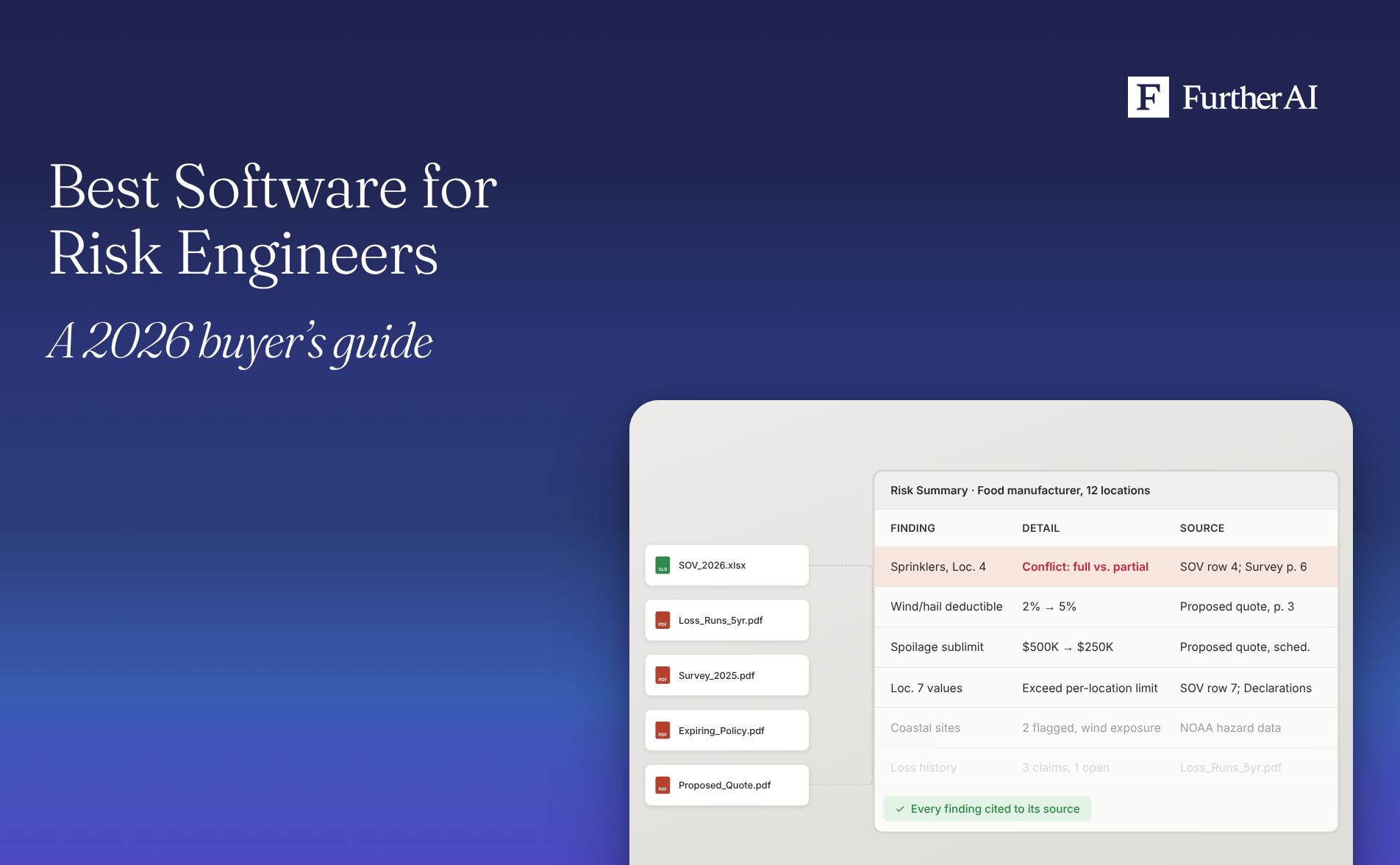
The best software for risk engineers in 2026 is an insurance-specific AI workspace such as FurtherAI, because it reads every document in an account (SOVs, loss runs, policies, quotes, and broker emails), keeps them in one view, and links each finding back to the page it came from. Most risk engineering teams pair it with a field survey tool for site visits and a property data provider for valuations and hazard scores. The deciding test for any tool is simple: can a reviewer click a finding and see the exact source behind it?
This guide compares the main categories of software risk engineers use, then walks through the jobs that matter most on complex accounts: pulling data together, proving it, spotting coverage adequacy problems, tracking what changed at renewal, and finding gaps between the current and proposed program.
Key takeaways
- No single category does everything. Field survey tools capture site evidence, property data providers supply valuations and hazard scores, and an insurance AI workspace reconciles documents and policies across the account.
- Verifiable means traceable. Every value in a risk assessment should link to the document, page, and passage it came from, so a reviewer can confirm it in seconds.
- Valuation gaps are common. A Kroll study cited by the Insurance Information Institute found an estimated 90% of buildings studied were underinsured, which makes coverage adequacy checks worth automating.
- Renewals hide quiet changes. A deductible, sublimit, or endorsement can change between the expiring and proposed policy without anyone flagging it. Side-by-side redlines catch these.
- Regulators expect documentation. As of October 8, 2026, 29 jurisdictions had adopted the NAIC Model Bulletin on insurers' use of AI, which expects insurers to maintain governance and documentation for the AI systems they use in decisions.
What risk engineers need from software
Risk engineers (also called loss control or risk control engineers) assess the physical and operational hazards of an insured's locations and recommend ways to reduce them. Chubb describes the work as inspections that "identify, quantify and evaluate the hazards" a business is exposed to, followed by practical risk improvement solutions.The Hartford's risk engineering team works with businesses to identify hazards and reduce exposures.
The field visit is only part of the job. Before and after it, a risk engineer works through statements of values (SOVs), loss runs, prior surveys, policy forms, and long broker email threads. That's where most of the time goes, and where errors slip in. Good software for risk engineers should handle five things:
- Ingest many sources. SOVs, loss runs, inspection and engineering reports, policies, quotes, and emails, in whatever format they arrive.
- Cite every finding. Each value and recommendation links back to the source page.
- Produce the assessment document. A structured risk summary or report your team can review and sign.
- Keep broker communication in one place. Emails and attachments land on the right account automatically.
- Track changes over time. Compare policies and exposures across renewals and between current and proposed programs.
Software for risk engineers compared
The table below compares the main categories by the five capabilities above. Example vendors are described from their own websites. Where a vendor doesn't state a capability publicly, we say so instead of guessing.
Capabilities are taken from each vendor's public pages as of November 2026. "Not stated" means we couldn't find it described publicly, not that the product lacks it.
In practice, the categories work together. A field tool captures what the engineer sees on site, a property data provider checks valuations and hazards, and an AI workspace ties those outputs to the SOV, loss history, policy wording, and broker correspondence for the account.
What is the best software for risk engineers to aggregate multi-source risk data?
Look for a tool that reads every source on the account and reconciles conflicts field by field. A common example: the SOV says a building is fully sprinklered, while last year's survey notes sprinklers in the warehouse only. The software should surface that conflict, show both sources, and let the engineer decide which one wins.
FurtherAI reads ACORD forms, SOVs, loss runs, and policy documents, normalizes them into one account record, and keeps a link from every field back to its source. At one top-10 global carrier, SOV intake dropped from 1 to 5 days to under 10 minutes, including SOVs with more than 50,000 locations, with field-level accuracy reaching 97% within six months.
For a step-by-step method with a worked five-source example, see our guide on how risk engineers aggregate multi-source risk data into one verifiable view.
Which software provides verifiable risk assessments for risk engineers?
A risk assessment is verifiable when a reviewer can trace every value and recommendation to the document, page, and passage it came from. That matters for underwriters who rely on your report, for auditors, and increasingly for regulators. The NAIC Model Bulletin expects insurers to maintain governance and documentation for AI systems used in decisions, and 29 jurisdictions had adopted it as of October 8, 2026.
When you evaluate a tool, ask three questions:
- Does each extracted value carry a citation you can click?
- Does the citation open the exact passage, or just the file?
- Are conflicts and missing data flagged as such, or silently filled?
FurtherAI responses are backed by clickable citations that highlight the area of the file behind each insight, and missing information is flagged with source citations.
What are the top solutions for automating risk assessment documentation?
Documentation automation turns reconciled data into a draft report: location details, construction and occupancy, protection, loss history, hazards, and recommendations. Loss control platforms such as Insurity generate risk reports from field data. AI workspaces such as FurtherAI generate risk summaries from the full document set, with citations attached.
GForce Innovations, Grange Insurance's innovation arm, selected FurtherAI for Grange's commercial lines risk control process, and Grange's team now uses it to streamline the workflows around each risk control engagement."By integrating FurtherAI's intelligent automation into our workflow, we can reduce manual work, streamline processes and create more capacity for our team to focus on complex risk assessments," said Jason Wrather, AVP, Innovation, GForce Innovations and Grange Insurance, in the partnership announcement.
For a detailed look at documentation tools and report standards, read our guide to automating risk assessment documentation.
Where can risk engineers consolidate broker communications into one view?
On a complex account, the most current information often sits in an email thread: a revised SOV, a note that a location was sold, a broker's answer to a survey recommendation. If those messages stay in individual inboxes, the risk file goes stale.
Look for software that reads the shared inbox, recognizes which account each message belongs to, and attaches the email and its files to that account automatically. FurtherAI's Inbox Agent reads every email and attachment, routes replies to the submission already in progress, and opens new emails as new submissions. FurtherAI also works inside Microsoft Outlook and SharePoint, so engineers don't have to leave the tools they already use.
Which platforms help risk engineers identify coverage adequacy issues in complex programs?
Coverage adequacy asks whether the program actually fits the exposure. On a large account that usually means checking three things against each other:
- Values against limits. Do the total insured values in the SOV fit within the limits, sublimits, and per-location caps in the program?
- Hazards against terms. Do the hazards your survey found (flood zone, wind exposure, combustible storage) line up with the deductibles, exclusions, and endorsements in the wording?
- Layers against each other. In a layered program, does each excess layer attach where the one below it ends, with no gaps in limits or terms?
Valuation is a frequent weak spot. In the Kroll study cited by the Insurance Information Institute, 68% of buildings valued from 2020 to 2021 were underinsured by 25% or more. Valuation tools such as Verisk 360Value help test the replacement cost side. An AI workspace helps test the policy side.
For layered programs, IRMI defines layering as "the building of a program of insurance coverage using the excess of loss approach." FurtherAI's tower analysis assembles the full tower from the relevant documents, with primary and excess layers organized automatically and limits, attachments, breakpoints, and pricing surfaced for review. FurtherAI Skills can also draw on official data from NOAA, FEMA, and the U.S. Census Bureau, such as flood claim history and coastline distances, so hazard flags sit next to the terms they affect.
What are the best solutions for tracking policy changes across multiple renewals?
Renewal changes are easy to miss because they're small. A wind and hail deductible moves from 2% to 5%. A spoilage sublimit drops. An endorsement that used to give back coverage disappears. Each change can shift the risk picture your assessment relies on.
The best tools compare policy versions line by line and keep a history across several renewals, so you can see when a term changed and why. FurtherAI redlines limits, deductibles, forms, and endorsements between policy versions, and can compare a submission against the last several renewals using documents already stored in SharePoint. At one mid-sized insurer, policy comparisons ran more than 30x faster with equal or better accuracy than manual work.
Underwriting teams that want a renewal-focused view can read our guide to automated renewal summaries.
What is the best software to identify coverage gaps between current and proposed policies?
A coverage gap is any loss scenario the insured reasonably expects to be covered that the proposed policy wouldn't pay, or would pay less for than the current one. Gaps between current and proposed policies usually come from four places:
- Narrower coverage grants or new exclusions
- Lower limits or sublimits
- Higher deductibles or new waiting periods
- Different base forms or missing endorsements
On the broker side, Vertafore's Exdion Policy Check compares policies against proposals and other source documents for agencies, and Newfront (now part of WTW) runs its own coverage gap analysis tool for its clients. On the insurer side, FurtherAI compares coverage breadth, terms, exclusions, and endorsements, including base forms and conditional endorsements, and lets reviewers jump directly to the changed clauses.
Risk engineers can then tie each gap to the exposure it affects in their survey. Brokers checking policies against quotes and binders can see our guide to AI policy checking software.
Workflow example: from raw submission to a sourced risk summary
Here's how the pieces fit on a single renewal. The account and figures are illustrative.
A broker emails a renewal for a food manufacturer with 12 locations. The email carries an updated SOV, five years of loss runs, last year's engineering survey, the expiring property policy, and a proposed quote.
- Capture. The email and all five attachments are filed to the existing account, not a new one, because the system recognizes the insured and the thread.
- Extract and reconcile. Values are pulled from each document into one record. The SOV lists Location 4 as fully sprinklered; the survey notes sprinklers in the warehouse only. The conflict is flagged with both sources.
- Compare policies. The expiring and proposed policies are redlined. The wind and hail deductible rises from 2% to 5%, and the spoilage sublimit falls from $500,000 to $250,000.
- Check adequacy. Total insured value for Location 7 is tested against its per-location limit, and hazard data is added for the two coastal sites.
- Draft the summary. A risk summary is generated with every finding cited. The engineer reviews the flags, resolves the sprinkler conflict, adds recommendations, and signs off.
The output looks like this:
Each source entry links to the exact passage, so the underwriter reading the summary can check any line without opening the full file set.
How to choose software for your risk engineering team
Start with the work that costs your engineers the most time outside the field. For most teams, that's pulling the account together and checking the policy against the exposure. Then test vendors on a real account:
- Use your messiest file. Include a scanned survey, a large SOV, and a long email thread.
- Click every citation. If a value can't be traced, it can't go in a signed report.
- Run a renewal comparison. Check whether the tool catches deductible, sublimit, and endorsement changes you already know about.
- Check the connections. Results should flow into the systems your underwriters use, and FurtherAI offers more than 100 enterprise integrations.
- Review security. Ask for SOC 2 Type II and confirm your data won't be used for model training. FurtherAI's security page covers both.
If you're also evaluating tools for the underwriters who use your reports, see our comparison of the best AI underwriting workflow software for carriers and MGAs.
Where FurtherAI fits
FurtherAI is an AI workspace built for commercial insurance. For risk engineers, it brings the account's documents and broker emails into one view, reconciles conflicting values, compares policies across renewals and proposals, and produces risk summaries where every finding links back to its source. Field survey tools and property data providers stay in your stack; FurtherAI connects their outputs to the policy and the paper trail.
To see it on one of your own accounts, book a demo with FurtherAI.
Frequently asked questions
DISCLAIMER
This article is for general informational purposes only and does not constitute legal, regulatory, compliance, underwriting, or other professional advice. The content reflects information available as of the date of publication, and FurtherAI undertakes no obligation to update it as laws, regulations, or AI technologies evolve.
Recent posts

Ready to go further and
transform your insurance ops?
Reclaim your time for strategic work and let our AI Assistant handle the busywork. Schedule a demo to see how you can achieve more, faster.