FurtherAI Available in Microsoft Marketplace
Introducing Connectors



The Underwriting Operations Playbook: Consistent Documentation Across Email Channels

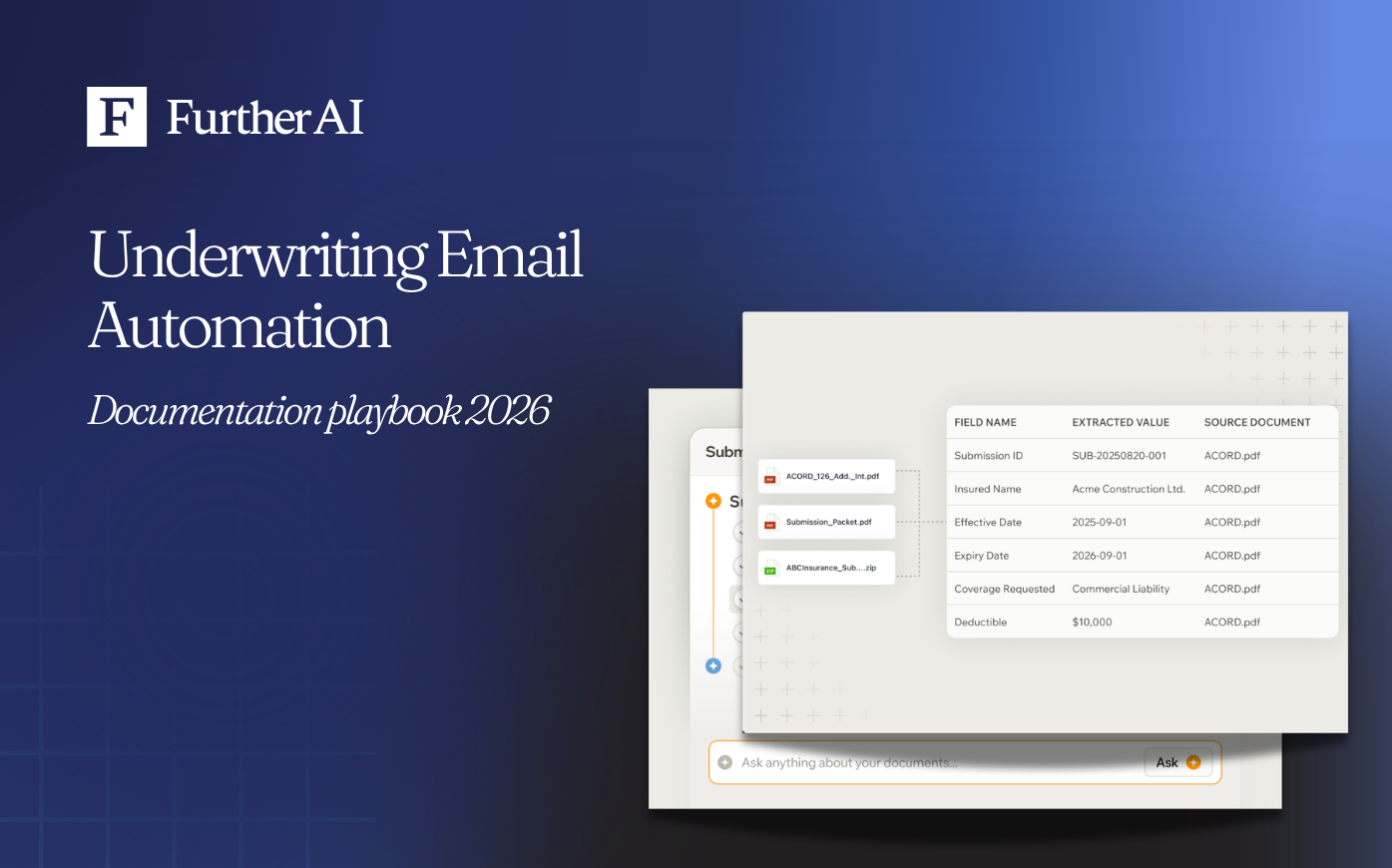
TL;DR — How do we create consistent underwriting documentation from email? Run a four-part stack: automated email intake captures every broker and insured message, intelligent document processing (IDP) and natural language processing (NLP) extract and normalize fields from PDFs and spreadsheets, a rules engine triages each submission against your appetite, and a governed repository stores every artifact with a full audit trail. It's built for carriers, managing general agents (MGAs), and brokers handling email-plus-PDF submissions. Done well, it cuts turnaround from days to hours, removes rekeying, and lowers audit exceptions.
Which platforms consolidate insured and broker emails for underwriting operations teams?
Platforms that unify four capabilities — automated email intake, IDP/NLP extraction, rules-based triage, and a governed document repository — consolidate insured and broker emails into structured, auditable submissions. These typically take the form of an insurance-specific AI workspace or underwriting workbench. FurtherAI is one such platform, purpose-built for insurance with human-in-the-loop controls, and it already processes nearly $30 billion in premiums across multiple lines of business.
"Our primary focus is eliminating the immense amount of manual work involved in processing unstructured data during submission and claims intake, where people are currently keying in information by hand." — Danny O’Lenic, Insurance Product Lead at FurtherAI
When you evaluate any tool, the question to ask is whether it covers all four layers end to end, or only one.
Modern underwriting still runs on email: agents and brokers submit PDFs, spreadsheets, and ad-hoc notes across scattered inboxes, which creates inconsistency, rekeying, and audit risk. Capgemini's 2024 World Property and Casualty Insurance Report found that between 41% and 43% of commercial and personal underwriters' time goes to administrative work like data entry and record-keeping, while only about a third is spent on core risk assessment.
Accenture's August 2025 survey of 430 underwriting executives, "Underwriting rewritten," points to the same root cause: 65% name ineffective systems as their top obstacle, with critical risk data still trapped in static PDFs. This playbook walks through the workflow that captures every email, structures the content, triages it, and documents each decision with full traceability.
Key takeaways
- Email is the dominant intake channel, so meet brokers where they are and automate structure downstream rather than asking them to change habits.
- A consistent documentation stack has four layers: intake, IDP/NLP extraction, rules-based triage, and a governed repository with audit trails.
- Direct, in-appetite risks can flow straight through, while gaps trigger an automated request for information (RFI) and out-of-appetite risks get a logged quick-decline.
- Governance is the differentiator: decision logs, role-based access, and immutable histories make the workflow audit-ready under SOC 2, GDPR, and CCPA.
- Track turnaround time, straight-through processing (STP) rate, extraction accuracy, and audit exceptions to prove the workflow is working.
How do you connect shared inboxes and routing rules for submission intake?
Submission intake automation is the process of ingesting, parsing, and routing inbound emails and attachments for underwriting without manual handling, while syncing artifacts to your systems of record. Email matches broker workflows and supports free-form narratives, but it introduces unstructured data, duplication, and missed information when it's left unmanaged.
Follow these steps:
- Create dedicated aliases by line of business (for example, submissions-commercial@ and submissions-marine@) and add regional routing where you need it.
- Maintain a sender allowlist for appointed agencies, and monitor the quarantine queue so legitimate submissions don't disappear.
- Connect each inbox to an intake automation layer that captures every email and attachment with zero disruption to broker habits.
- Confirm the tool ingests PDF, Word, Excel, images, and handwritten notes, with optical character recognition (OCR) for scans.
- Push structured data and artifacts directly into your policy administration system (PAS) or customer relationship management (CRM) system, rather than trapping content in mailboxes.
Expected result: every inbound submission is captured, time-stamped, and routed to the right queue automatically, with attachments preserved and linked.
Common failure modes: unmonitored quarantine queues that swallow submissions, aliases that don't map to a clear owner, and intake that captures the email body but drops attachments or fails on scanned documents.
What files should intake support besides PDFs?
Intake should support PDF, Word, Excel, common image formats, and scanned or handwritten notes, because brokers send all of them. Map each attachment type to the content you need and the processing it requires.
How do you extract and normalize fields from PDFs and spreadsheets?
NLP for underwriting uses AI to read unstructured emails and documents and turn them into structured, decision-ready data. Many teams centralize this in an underwriting workbench so intake, decisioning, and documentation share a single source of truth.
Follow these steps:
- Extract granular fields — claims history, loss runs, addresses, coverage details, risk characteristics, and mandatory values such as TIV and prior claims — from PDFs, spreadsheets, and email bodies.
- Classify each incoming document automatically (ACORD forms, loss runs, schedules, endorsements) so nobody sorts attachments by hand.
- Normalize names, addresses, risk types, and identifiers to your standard data model.
- Deduplicate contact and account records to maintain a single customer view.
- Write the structured output back to your PAS or CRM with the source artifact attached.
To normalize loss runs specifically, parse each carrier's layout into a common schema (claim number, loss date, cause, paid, incurred, reserve, status), then reconcile multi-year files into one consolidated history before scoring.
Target these data points for extraction:
- Insured details: legal name, DBA, FEIN, addresses, contact info
- Policy: line of business, effective and expiration dates, limits, deductibles, forms
- Exposure: TIV, payroll, receipts, vehicle and driver schedules, property attributes
- Loss history: claim counts, dates, paid/incurred, large-loss flags, causes
- Risk indicators: prior cancellations, safety programs, construction, occupancy, protection
- Broker metadata: agency, producer, emails, time-stamps, conversation threads
- Document metadata: source, version, signature status, attestation dates
Expected result: clean, normalized, deduplicated records mapped to your data model, ready for scoring with the original document attached for reference.
Common failure modes: silent extraction errors on low-quality scans, inconsistent loss-run schemas left unreconciled, and duplicate accounts that fracture the customer view.
How does triage decide appetite?
Automated triage classifies and routes each submission against predefined risk and eligibility criteria using appetite grids and a rules engine. Standard, in-appetite risks can flow straight through, while out-of-appetite or complex risks get flagged for review or referral.
Follow these steps:
- Receive the submission and classify the document set.
- Validate completeness, and auto-trigger an RFI if required documents or fields are missing.
- Score the submission against your appetite grid and risk criteria.
- If it's in-appetite and clean, send it down the zero-touch quoting and bind path.
- If it's borderline or complex, route it to a specialist underwriter with full context attached.
- If it's out-of-appetite, trigger a quick-decline with a reason code and a logged decision.
Expected result: clean standard risks move to quote in minutes, exceptions reach the right underwriter with context, and every routing decision is recorded.
Common failure modes: appetite grids that drift out of date, thresholds with no owner, and declines issued without a documented rationale, which creates regulatory exposure.
How do you handle requests for information without manual chasing?
An RFI workflow detects missing data, asks the broker for exactly what's needed, then resumes triage automatically once it arrives. Incomplete submissions degrade accuracy and inflate underwriter workload, so automate the chase.
Follow these steps:
- Detect missing fields or documents during intake or validation.
- Generate a personalized email to the broker with a concise checklist and a secure upload link.
- Track RFI status and due dates, and send reminder nudges based on your service-level agreement (SLA).
- On receipt, re-validate the submission, reconcile versions, and update the data record.
- Resume the triage path automatically, and notify the owning underwriter if the item was escalated.
Expected result: submissions are complete before they reach an underwriter, manual email volume drops, and response times improve.
Common failure modes: vague RFIs that prompt another round of questions, no due dates, and re-received documents that aren't reconciled against the original version.
What belongs in a governed repository?
A governed repository stores every submission artifact — narratives, pricing worksheets, endorsement requests, and emails — with consistent file names, version metadata, and a link to the correct client or policy record. Consistent documentation depends on structured, durable storage.
Follow these steps:
- Create a standardized folder structure for each submission.
- Store every artifact with a consistent file name and attach metadata: version, author, and time-stamp.
- Link each folder to systems of record such as SharePoint, AWS S3, your CRM, or your PAS.
- Tie each submission folder to the correct client or policy record to maintain a single customer view.
- Apply role-based access and retention controls so retrieval is effortless during an audit.
Document provenance is the end-to-end traceability of every document and processing step, from original email receipt through parsing, edits, approvals, and final bind, so a reviewer can reconstruct how and why a decision was made.
Expected result: any artifact is retrievable in seconds, tied to the right record, with a complete version history.
Common failure modes: orphaned documents with no policy link, inconsistent file names that break search, and no retention policy, which complicates audits.
How do you enable audit trails and monitor performance?
An audit trail is the digital record of every action, decision, and document touchpoint across the submission lifecycle, enabling full traceability and compliance validation. Regulatory-grade auditability builds trust and accelerates adoption.
Build governance around three principles:
- Transparency: keep decision logs, model outputs, and rationale available to reviewers.
- Feedback loops: let underwriters correct parsed data, and feed those corrections back within governed guardrails.
- ROI visibility: monitor throughput and quality metrics to guide tuning.
Align controls to the frameworks your auditors care about: SOC 2 from the AICPA for service-organization controls, the General Data Protection Regulation (GDPR) for EU data subjects, and the California Consumer Privacy Act (CCPA) for California residents. Combine structured decision logs and retention controls with role-based access and immutable event histories.
This is the kind of audit-by-design workflow that pays off in practice. A FurtherAI reinsurer customer supporting more than 100 MGAs cut audit time by 45%, from about 200 hours to roughly 110 hours per MGA, by automating the data-extraction and validation phase so underwriters could focus on judgment. On the intake side, an MGA reported 30x faster submissions and 200%+ efficiency gains after automating the same stack.
"Audit readiness breaks down when evidence has to be reassembled after the fact — by then, the trail is cold and the context is gone. FurtherAI solves that by embedding source-cited AI directly into the workflows that generate audit evidence in the first place, with inline citations, reviewer-in-the-loop checkpoints, and every output captured as structured data in a clean, organized record that stays queryable long after the work is done. The result is documentation that's defensible by default and instantly retrievable today or tomorrow, aligned with NAIC AI Model Bulletin expectations around traceability and human oversight." — Danny O’Lenic, Insurance Product Lead at FurtherAI
Frequently asked questions
How can automation improve consistency in underwriting documentation?
Automation captures every submission, parses it, and maps it to standard data fields, so the same information lands in the same place every time. That removes manual rekeying and the inconsistencies it creates, and it produces an end-to-end audit trail for compliance. The result is documentation a reviewer can trust and reconstruct, regardless of which broker or inbox the submission came from.
What types of email attachments should underwriting operations support?
Support PDF, Word, Excel, common image formats (JPG, PNG, TIFF), and scanned or handwritten notes, with OCR for anything that isn't machine-readable. Brokers send all of these, so coverage gaps create blind spots and manual workarounds. The goal is complete, accessible intake: every attachment captured, classified, and tied to the submission record so nothing is lost between the inbox and the underwriter.
How do integration capabilities enhance underwriting workflow automation?
Integration with your PAS, CRM, and document repositories lets structured data flow automatically between stages instead of being rekeyed. Each submission stays linked to the right client or policy record, which preserves a single customer view and speeds decisions. Without integration, content gets trapped in mailboxes and spreadsheets, recreating the silos and rekeying the workflow is meant to eliminate.
What are best practices for maintaining compliance in digital underwriting?
Enforce role-based access, keep detailed and immutable audit trails, use secure and governed storage, and align workflows to SOC 2, GDPR, and CCPA. Persist decision logs, model outputs, and rationale so reviewers can reconstruct any decision. Pair retention controls with human-in-the-loop review so underwriters can correct parsed data within guardrails, which keeps both accuracy and accountability intact.
How do you measure whether the workflow is working?
Track submission turnaround time, STP rate, extraction accuracy, manual correction rate, and audit exceptions per 100 submissions. Speed metrics show efficiency gains, quality metrics confirm the parsing is reliable, and compliance metrics prove audit readiness. Watching them together prevents a common trap: moving faster while degrading loss selection or documentation quality.
How can teams drive adoption of automated underwriting tools?
Adoption improves when underwriters are involved early, the interface is intuitive, decision logs are transparent, and correction paths are simple. When people can see why the system made a call and fix it in one step, trust follows. Starting with a high-volume, lower-complexity workflow — like submission intake or loss-run processing — lets teams build confidence before expanding to harder decisions.
Put the playbook to work
Looking to operationalize this stack? Explore how FurtherAI orchestrates email intake, IDP/NLP, triage, and governed repositories with human-in-the-loop controls to accelerate underwriting while strengthening compliance, and see the measurable ROI teams report after deploying it.
DISCLAIMER
This article is for general informational purposes only and does not constitute legal, regulatory, compliance, underwriting, or other professional advice. The content reflects information available as of the date of publication, and FurtherAI undertakes no obligation to update it as laws, regulations, or AI technologies evolve.
Recent posts
Ready to go further and
transform your insurance ops?
Reclaim your time for strategic work and let our AI Assistant handle the busywork. Schedule a demo to see how you can achieve more, faster.




.svg)